


Remote IT jobs allow professionals to support computer systems networks users and digital services without working in a traditional office every day. These positions range from technical support and network administration to cyber security cloud operations and enterprise systems work. Finding the right position still requires more than typing a broad phrase into a job board. Some listings restrict applicants to certain states. Others require previous experience or specific certifications. A position may also be advertised as remote even though occasional office visits or fixed working hours are required.
This guide explains how these roles work in the United States. It covers common career paths and the skills employers may expect. It also explains salary data and application preparation. You will learn how to evaluate location rules and prepare for interviews without relying on exaggerated promises or unverified vacancies.
What Are Remote IT Jobs?

The word remote can mean different things across employers. One company may allow employees to work entirely from home. Another may require monthly office visits or limit hiring to applicants who live in approved states. A fully distributed role normally allows daily work outside the employer’s office. Employees may still need to follow fixed hours and attend online meetings. They may also need to live within the United States for payroll and legal reasons.
A hybrid position combines home and office work. The employer may require one or more office days each week. A work from anywhere position is more flexible but it is less common than a US only arrangement. Contract work can also be completed outside an office. Contractors may receive fewer employee benefits and may need to manage their own taxes. The agreement should clearly explain the schedule and payment terms.
Location restrictions matter even when the work can be done online. Employers may limit hiring because of payroll registration and tax rules. They may also need coverage in a particular time zone. Some roles involve government systems or regulated data and may require US citizenship or a clearance. Read the complete description before applying. Check the approved location and working hours. Confirm whether the position is fully distributed or hybrid. This small review can prevent wasted applications.
Common Remote Technology Roles

Information technology includes many career paths. Coding is only one part of the field. Support and infrastructure work can also be completed through secure online systems.
Remote IT Roles Comparison
| Remote IT Role | Main Work | Typical Level |
|---|---|---|
| Helpdesk Specialist | User accounts hardware and software support | Entry |
| Technical Support Specialist | Product and application troubleshooting | Entry to Mid |
| Network Support Specialist | Connectivity monitoring and network fixes | Entry to Mid |
| Systems Administrator | Servers accounts permissions and updates | Mid |
| Cloud Support Specialist | Cloud access services and incident support | Entry to Mid |
| Cybersecurity Analyst | Threat monitoring and incident response | Mid |
| Software Developer | Build test and maintain applications | Entry to Senior |
| IT Consultant | Assess systems and advise clients | Mid to Senior |
| IT Manager | Lead teams projects and IT operations | Senior |
Technical Support and Helpdesk Work
A helpdesk specialist assists users who cannot access a system or complete a task. The specialist may investigate software errors and account problems. They may also guide a client through a repair or configuration process. Beginners who want a more focused starting point can explore our remote help desk jobs entry level guide for Tier 1 roles skills and practical hiring tips.
O*NET describes computer user support work as answering questions and resolving hardware or software problems. Common duties include diagnostics and system setup. Workers may also maintain records of problems and corrective actions. This path may suit applicants with customer service experience and basic technical knowledge. Strong written communication matters because many issues are handled through email and ticketing systems.
Network and Systems Roles
A network specialist helps keep connections and services operating. The work may involve routers and cloud networks. It can also involve a server or virtual system. O*NET lists tasks such as testing networks and reviewing usage. It also includes maintenance and equipment configuration. Integration with an existing environment is another common responsibility.
A systems administrator may install updates and manage user accounts. The administrator may monitor performance and control access. Some organizations also expect this person to support backups and recovery plans. These positions often require practical experience. A home lab can help an applicant demonstrate how they configure systems and document changes.
Cloud and Cyber security Work
Cloud teams maintain online services and business applications. The work may include access management and performance monitoring. It may also involve incident response and compliance. A cyber security analyst protects systems from threats. The analyst may investigate alerts and recommend safeguards. Strong communication is important because risks must be explained to both technical teams and business leaders. BLS notes that information security analysts need problem solving skills and close attention to system changes.
Software and Data Roles
Software professionals design and maintain applications. Some focus on testing or quality assurance. Others work on implementation and ongoing support. Data and analytics teams organize information and create useful reporting. Artificial intelligence is also influencing the type of skills companies seek. BLS reported in July 2026 that wider adoption of AI and generative AI tools is expected to support growth in several computer and mathematical occupations. This does not mean every technology professional needs to become an AI engineer. It means many workers will need to understand how new systems affect their own role. They must also know when to validate automated output and when human review is required.
Enterprise and Leadership Roles
Larger organizations employ enterprise architects and implementation specialists. They may also hire an IT consultant to assess systems or coordinate a major rollout. A senior engineer may own complex projects. Some employers shorten senior to Sr in the title. A principal specialist usually handles high level technical decisions. A senior manager may oversee teams and budgets.
O*NET describes information systems managers as professionals who assess organizational needs and recommend improvements. Their work may include data security and disaster recovery. It may also include hiring and operational reporting. Leadership positions often require the ability to manage cross-functional teams. The person may serve as a liaison between business leaders and technical staff. They may also work with a vendor or technology partner. Choose two or three role types that match your present experience. A focused search usually produces better applications than applying to every opening with IT in the title.
How to Choose the Right Information Technology Role
A title can sound attractive while the actual duties do not match your background. Read the responsibilities before deciding whether a position is suitable. Start with the problems you already know how to solve. Customer support experience can support a move into user assistance. Experience with routers and access points may align with network work. Experience with business processes may support systems analysis or SaaS implementation.
Then compare the expected level. An entry role may require supervision and basic task execution. A mid-level professional is often expected to work with less direction. A senior professional may lead technical work and make decisions that affect multiple teams. Management and principal roles usually require broader ownership. A manager may oversee staff and productivity. A principal specialist may define standards and influence governance without managing employees directly.
Schedule requirements also matter. Some support teams operate outside standard business hours. BLS notes that computer support services may need coverage around the clock. Some specialists therefore work nights or weekends. Compare the employment type before applying. Full-time employee positions may include insurance and paid leave. Contract roles may offer flexibility but less stability. On-call work may increase responsibility even when the normal schedule appears attractive.
Choose a position based on duties and working conditions rather than title alone.
Technical Skills and Security Expectations
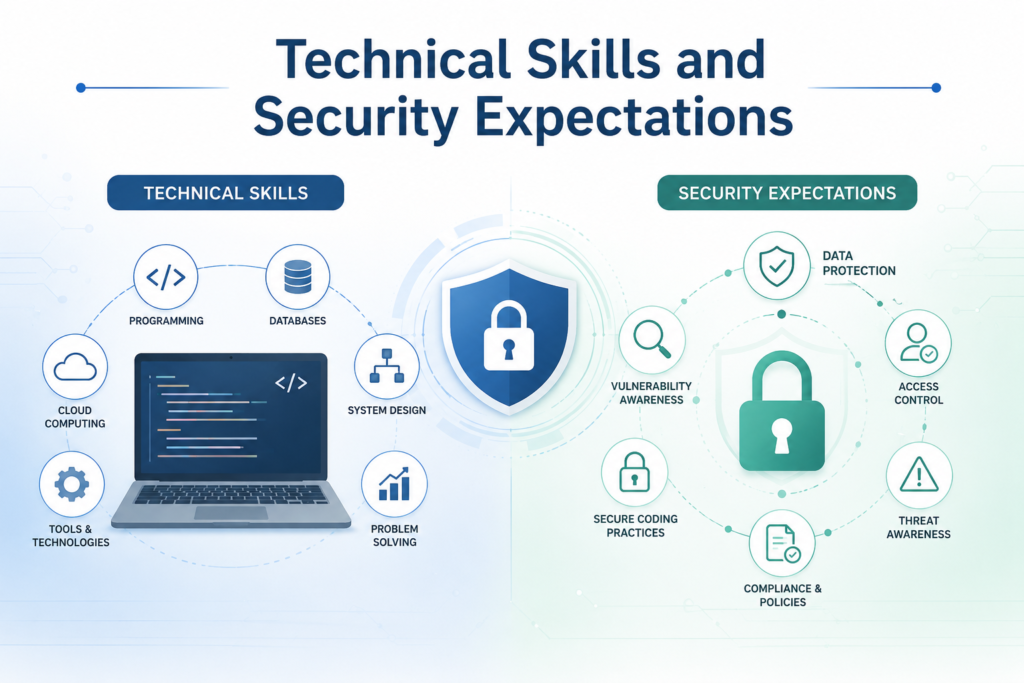
Employers need workers who can solve problems and explain what happened. Technical knowledge matters but communication and documentation can determine whether a distributed team works effectively.
Core Technical Skills
The right skill set depends on the role. Support workers may need knowledge of operating systems and ticketing platforms. A network engineer may need routing and connectivity knowledge. Cloud teams may work with virtual machines and identity services. Troubleshooting is a core skill across many paths. A good process begins by defining the problem. The worker gathers evidence and tests the most likely cause. They then implement a safe fix and confirm the result. Technical workers may need to administer accounts and maintain system records. They may deploy updates or configure services. They must also understand when to escalate an issue instead of making an unsupported change.
Communication and Documentation
Distributed teams rely heavily on written communication. A clear update should explain what was attempted and what happened. It should also identify the next action. Documentation protects the organization from repeated mistakes. It helps another employee follow a process without guessing. It also improves collaboration when workers are in different time zones. A strong applicant can describe how they coordinate work and deliver updates. They can explain how they manage an incident from the first report through resolution. This type of evidence is more useful than a long list of tools.
Security and Data Protection
Every worker has some responsibility for protecting systems. Employees may need to follow an access policy and use approved devices. They may also need to protect confidential files during video calls and screen sharing. Security specialists handle deeper responsibilities. They may monitor alerts and investigate suspicious activity. They may implement controls and support compliance reviews. Applicants should not claim advanced cybersecurity knowledge without evidence. A small project that shows secure configuration and accurate documentation is more credible than a vague expert label.
AI Tools and Automation
Teams may use automation to handle repetitive work. They may also use AI tools to summarize data or draft documentation. These tools still require human review. Sensitive information should not be entered into an unapproved service. Workers should understand company rules before using artificial intelligence on client data or internal material. Employers value people who can explain both the benefit and the risk of a tool. Responsible use is more valuable than adding AI to every process.
Qualifications and Certifications
A four year degree can help with some careers but it is not the only way to demonstrate ability. Requirements vary by occupation and employer. BLS states that information security analysts typically need a bachelor’s degree in a computer science field and related experience. It also notes that employers may prefer professional certification. Other support positions may have more flexible education requirements. Read each listing carefully. Do not assume that one employer’s requirement applies to every company.
Certifications can support a career plan when they match the target role. General support credentials may help a beginner organize core knowledge. Network and cloud credentials may support a more specialized path. Security credentials may be useful when an applicant already understands systems and networking. Microsoft currently offers role based certifications and practical Applied Skills across AI and cloud scenarios. Its official credential system includes different levels and lab based assessments.
A certificate does not guarantee employment. It becomes more useful when paired with proof of practical work. A home lab can provide that proof. You can build a virtual network and deploy a small service. You can create user accounts and control permissions. You can document an error and show how you fixed it. A good project should explain the goal and the environment. It should also explain the result. This gives an employer something concrete to assess.
How Beginners Can Prepare for Remote IT Work
Applicants with no formal experience should build a realistic entry path. Applying immediately to advanced engineering roles often leads to rejection because the required evidence is missing. Start by identifying transferable strengths. Customer service can show patience and communication. Administrative work can show accuracy and time management. Retail experience can show how you handle pressure and explain information clearly. Next build practical evidence. Create a simple lab and learn how systems connect. Practice account setup and permissions. Record each step in clear documentation.
You can also complete a relevant course or credential. Choose one that supports the role you want. Do not collect certificates without using the skills. Small volunteer or freelance projects may help when they are legitimate and properly defined. You might help an organization organize accounts or improve device setup. Protect all private data and avoid work beyond your ability. You should also demonstrate that you can work independently. Explain how you plan a task and report progress. Show how you ask for help before a small problem becomes a larger incident. A beginner does not need to know everything. The goal is to prove that you can learn and follow a reliable process.
Remote IT Job Salaries and Employment Terms
BLS reported a median annual wage of $105,990 for computer and information technology occupations in May 2024. It also projected that employment across this broad group would grow much faster than the average for all occupations from 2024 to 2034. These figures cover the full occupation group and are not remote-only salary data. Support roles often have different pay levels from specialized security or management positions. BLS reported May 2024 median annual wages of $60,340 for computer user support specialists and $73,340 for network support specialists.
The May 2024 median was $103,790 for computer systems analysts and $124,910 for information security analysts. Again these are national occupation figures rather than salary estimates limited to home based workers. Your actual offer may depend on experience and location. Employer size and shift requirements can also affect compensation. A role that involves clearance or on-call work may pay differently from a standard daytime position.
Look beyond base pay. Review health coverage and retirement benefits. Check paid leave and equipment support. Ask whether the employer provides a computer or internet allowance. Contractors should review payment schedules and tax responsibilities. They should also understand whether the agreement includes guaranteed hours.
Compare the complete employment package before accepting an offer.
Where to Find Legitimate Remote IT Jobs
A job board can help you discover openings. It should not be the final source you trust. Some platforms use phrases such as jobs added daily. Others invite applicants to search the best remote jobs from top companies. Treat these statements as marketing language rather than proof that every listing is active. A page may also promise top remote opportunities in every industry. Verify each position on the employer’s official career site before sharing personal information. Start with companies whose products or services interest you. Visit the official careers page and use its search tools. Check whether the position is still posted. Confirm the location and application method.
Professional networks can also help. Follow employers and people who work in your target field. A useful connection may help you understand the team. It should never involve payment for access to an interview. Staffing companies may support temporary or contract hiring. A recruiter hiring remote staff should be able to explain the client and responsibilities.
They should communicate through a professional channel and provide a clear process. A startup board may reveal smaller companies that are not visible on large platforms. Smaller companies still require the same verification. Review the company site and product. Confirm the legal business name and recruiter domain. You can also check federal and state employment resources. Government listings should be available without a payment fee. The FTC warns that federal and postal openings are free to view and free to apply for. Use third party sites for discovery. Use the official employer site for confirmation.
How to Apply for Remote IT Jobs

Strong applications connect the applicant’s experience to the employer’s actual needs. A generic CV rarely makes that connection. Read the description more than once. Separate required skills from preferred skills. Identify the tools and responsibilities that appear central to the role. Then review your own experience. Select examples that show the same type of work. You do not need to copy the employer’s wording. You need to provide honest evidence. A support applicant might explain how they resolved account access issues and maintained records. A network applicant might explain how they monitored performance and reduced interruptions. A systems applicant might describe a successful integration or upgrade.
Use measurable results when they are available. State the number of users supported or the reduction in response time. Do not invent figures. Your CV should make the strongest evidence easy to find. Place relevant skills and projects near the top. Remove unrelated details that distract from the target position. A cover letter should add context instead of repeating the CV. Explain why the role fits your background. Mention one or two useful examples. Submit the application through the official portal whenever possible. Save the description because it may disappear after applications close. Record the submission date and company contact.
Follow up only when the employer provides a suitable channel. A short professional message is enough.
How to Prepare for a Remote IT Interview
An online interview can test technical knowledge and communication at the same time. Preparation should cover both. Review the responsibilities and build several examples from your experience. One example might explain how you investigated a system problem. Another could show how you handled a difficult user or unclear request. Use a simple structure when answering. Explain the situation and your responsibility. Describe the action you took and the result. Technical questions may focus on process rather than memorized definitions. An interviewer may ask how you would assess an outage or validate a repair. They may ask how you would protect data during an urgent request.
Leadership applicants may need to explain how they execute a plan and oversee risk. A consultant may need to show how they communicate with a partner or client. A management applicant may need to discuss budgets and team priorities. Prepare for questions about your home environment. The employer may ask about reliable internet and working hours. They may also ask how you remain productive without direct supervision. Test your camera and microphone before the meeting. Open the meeting software and confirm your display name. Choose a quiet location and keep a backup contact method ready.
Do not read scripted answers. Practice your main examples until you can explain them naturally.
Remote Job Scam Warning Signs

Demand for work from home positions gives scammers a large audience. Fake recruiters may copy a real company name and create convincing messages. The FTC states that employment scammers often want money or personal information. Common methods include fake checks and paid starter kits. Some scams also involve useless training or certifications. Be cautious when an unknown person sends an unexpected offer. A message that provides high pay but almost no description is a warning sign. The FTC reported a 2026 scam pattern in which fake recruiters used text messages and asked recipients to reply before introducing payment or task schemes. A real employer should not ask you to pay for a position.
Do not deposit a check and return part of the money. The original check may appear to clear before the bank identifies it as fake. Watch for email addresses that do not match the company domain. Be careful when the interview takes place only through a messaging app. Do not provide bank details or a Social Security number before you have verified the employer and reached a legitimate hiring stage. Search the company name and the recruiter’s name. Find the official website independently. Contact the company through a published phone number or email address.
Keep copies of suspicious messages. Stop communicating if payment is requested. Report suspected fraud through the FTC reporting system.
Challenges of Working in a Remote IT Role
Working from home removes the commute but it creates other demands. Communication can be slower when team members work across time zones. A small misunderstanding may delay a project. Clear updates and shared documentation reduce this risk. Isolation can also affect motivation. Regular team contact helps but it does not fully replace office interaction. Workers should create a routine and protect time away from the screen. Home systems must also support reliable work. Weak internet can interrupt calls and access. A secure router and private workspace may be required. Some companies provide equipment while others expect the worker to maintain an approved setup.
Security responsibilities can be strict. Employees may need to use a company device and approved VPN. They may also need to follow rules for printing and file storage. On call expectations should be discussed before accepting an offer. An operational role may require evening response. Ask how often this happens and how the company compensates employees. Read the agreement and ask clear questions. Flexibility is valuable only when the working conditions fit your life.
Is a Remote IT Career Right for You?
This path can suit people who enjoy solving problems and learning new systems. It also requires self-management and clear communication. Consider how you respond when instructions are incomplete. Think about whether you can organize your own day and report progress without repeated reminders. Your workspace matters too. You need dependable internet and a place where private information will not be exposed. You should also be comfortable following company rules even when no manager is in the room.
Identify two or three roles that match your current ability. Compare the required skills and assess the gaps. Choose one practical project or credential that addresses the most important gap. Then update your CV and begin reviewing verified openings. A focused plan is more effective than applying randomly.
Can IT jobs be fully remote?
Yes. Many support and systems roles can be performed outside a company office. The arrangement still depends on the employer. Some positions require fixed hours or approved state residency. Others include occasional office visits. Read the location and schedule requirements before applying.
Which roles are best for beginners?
User support and service desk positions can provide realistic entry points. They often value troubleshooting and communication. Junior operations roles may also be suitable. The best option depends on your current skills and the employer’s requirements.
Can I get this type of work without a degree?
Yes. Some employers accept practical experience and certifications in place of a degree. Other careers may still require formal education. Review each description and show evidence through projects or previous work.
Which certifications can help?
The right certification depends on your target path. General support credentials may help beginners. Network and cloud certifications may suit infrastructure work. Security credentials can support a cybersecurity path. A certificate works best when paired with practical evidence.
Can a US employee work from any state?
Not always. A company may limit hiring to states where it can legally employ and pay workers. Time zones and client requirements may also affect eligibility. Check the approved locations before applying.
What equipment is normally required?
Most workers need a reliable computer and internet connection. They may also need a headset and private workspace. Some employers provide equipment. Others publish minimum system requirements before hiring.
How can I identify a fake position?
Verify the opening on the company’s official career page. Check the recruiter’s email domain and avoid any request for advance payment. Do not deposit a check and return money. Be cautious when the company provides little information.
How should I tailor my CV?
Match your strongest evidence to the description. Show relevant tools and projects. Explain useful results and remote collaboration experience. Remove unrelated information that hides your best qualifications.
Conclusion
Remote IT jobs can create valuable career opportunities for people with the right technical ability and work habits. The strongest approach begins with choosing a clear role instead of applying to every technology position you see. Compare the responsibilities with your experience. Build practical evidence where skills are missing. Use current salary data carefully and remember that national occupation figures are not remote only pay estimates. Verify every vacancy through an official source.
Tailor your CV and prepare examples for the interview. Protect your information when a recruiter or offer appears suspicious. Your next step is simple. Select two suitable roles and review several verified descriptions. Note the skills that appear most often. Then update your CV around the evidence you can honestly provide.

1 Comment
Pingback: RN Work From Home Positions: Remote Nursing Jobs Guide for Nurses