


Remote help desk jobs entry level can provide one of the most practical ways to begin an IT career without already having years of professional technology experience. These roles are designed around helping users solve everyday computer problems setting up accounts troubleshooting hardware and software issues documenting support requests and escalating more complex problems when necessary. The opportunity is broader than the title Help Desk Technician. Employers may advertise similar beginner roles as Service Desk Technician IT Support Specialist Help Desk Analyst Tier 1 Support Agent Technical Support Representative End User Support Technician or Junior IT Support Specialist. Searching several related titles can therefore uncover opportunities that an exact title search might miss.
The U.S. Bureau of Labor Statistics classifies help desk technicians within computer user support specialists. These professionals diagnose user problems document issues guide users through troubleshooting steps and provide assistance through phone chat email or in person. BLS also notes that some computer support specialists telework while others work on site or travel to user locations. For beginners the important question is not whether you already know everything. Employers usually want evidence that you can solve basic problems logically communicate clearly learn new tools and stay patient with users who may be frustrated.
What Are Entry Level Remote Help Desk Jobs?
An entry level remote help desk job involves providing technical assistance to users while working primarily from home or another approved remote location. You may support employees inside one company customers using a software product users of internet or telecom services or clients supported by an outsourced IT provider. The technology differs between employers but the underlying job is similar understand the problem gather useful information attempt appropriate troubleshooting and either resolve the issue or send it to the correct higher level team.
BLS describes computer user support specialists as professionals who help users with hardware and software issues and who may provide support through phone online chat email or in person.
What Does an Entry Level Help Desk Technician Do?
A Help Desk Technician is often the first person a user contacts when something stops working. A normal request might involve a forgotten password slow computer locked account printer problem Microsoft 365 issue missing application Wi Fi connection problem or basic software error. The technician first determines what the user is experiencing. Instead of immediately guessing at a solution they ask questions confirm symptoms and narrow down possible causes. Once the issue is understood the technician follows troubleshooting steps documents what was attempted and records the result in the ticket.
If the problem requires higher permissions or deeper technical expertise it is escalated to Tier 2 support system administrators network engineers or another specialist. This ability to know when to continue troubleshooting and when to escalate is an important part of professional help desk work.
Help Desk Versus Service Desk
Help desk and service desk are often used interchangeably in job listings especially at entry level. A traditional help desk is mainly focused on resolving technical issues. A service desk may have a broader scope that includes user requests equipment access onboarding software requests account administration and IT service management processes. In practice a Service Desk Technician Tier 1 position can look very similar to an entry level Help Desk Technician role. Job seekers should therefore read the responsibilities rather than excluding an opportunity because the employer uses service desk instead of help desk.
Help Desk Versus Customer Service
Customer service and help desk roles both require communication and patience but their main goals are different. A customer service representative may help with billing orders account questions or general service issues. A help desk professional is expected to troubleshoot technology. Some positions combine both functions. A current Concentrix remote Customer Service Tech Support Representative role for example involves resolving hardware software and client product issues while also providing customer support and documenting information. That overlap can make customer service experience valuable for someone entering IT but you should still build enough technical knowledge to handle actual troubleshooting.
Remote Hybrid and On Site IT Support Roles
Remote support does not mean every help desk job can be performed from anywhere. Some organizations can support almost everything through remote desktop tools chat phone and device management platforms. Others need technicians physically available to replace hardware configure laptops or troubleshoot office equipment. BLS reports that some computer support specialists can telework while others must work on site or travel to customer locations. This is why you may see jobs described as fully remote remote within a specific state hybrid or mostly remote with occasional office attendance.
Can You Get a Remote Help Desk Job With No Experience?
Yes it is possible but no experience should not mean no preparation. Some employers are open to candidates who do not have previous IT job titles if they can demonstrate basic technical knowledge customer service ability and willingness to learn. BLS says education requirements for computer user support specialists vary and that these positions do not necessarily require a college degree. Candidates may qualify through relevant coursework practical computer knowledge or a high school diploma combined with useful IT certifications.
What Employers Mean by Entry Level
Entry level does not always mean that an employer expects absolutely zero exposure to technology. A company might ask for six months of customer support familiarity with Windows basic networking knowledge or experience helping users informally. Another employer may prefer one year of customer service but only consider technical support experience a bonus. Concentrix’s current remote technical support role for example requires customer service experience while listing technical support experience as preferred rather than mandatory. This is why candidates should not automatically reject themselves because they have never had Help Desk Technician as a previous job title.
Transferable Experience That Can Help
Many beginners already have experience that is relevant to help desk work. Retail workers deal with frustrated customers. Call center employees learn how to communicate under pressure. Administrative employees work with software and user accounts. Students troubleshoot laptops Wi Fi and applications. Office workers use Microsoft 365 printers and shared systems. The key is translating that experience into the language of support. Instead of writing only that you helped customers explain that you identified problems asked questions documented requests and guided people toward a resolution.
Customer Service Experience as a Starting Point
Customer service is especially valuable because technical knowledge alone does not make someone a strong support professional. BLS lists communication, customer service listening and problem solving abilities among important qualities for computer support specialists. A user who cannot access an important application may already be stressed before contacting support. The technician needs to solve the problem without making the user feel blamed or confused. If you already know how to communicate calmly with customers you have one part of the help desk skill set. You can then add technical knowledge on top of it.
When Certifications Can Strengthen Your Application
Certifications can help when your resume does not yet show professional IT experience. They can demonstrate that you have invested time in learning foundational concepts and may help your resume pass an initial screening. BLS notes that certification can be a useful starting point for workers trying to enter computer support occupations although requirements differ by employer. A certification should support practical ability rather than replace it. Someone who has memorized terminology but cannot explain how they would troubleshoot a basic connectivity problem may still struggle in interviews.
Common Entry Level Remote Help Desk Job Titles
One of the easiest ways to improve a job search is to stop searching only one title.
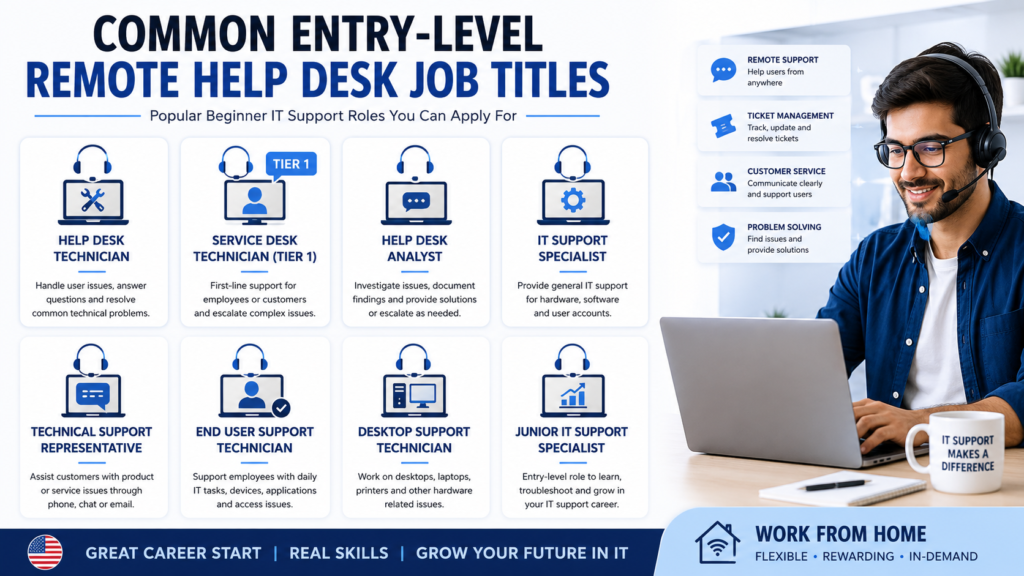
The same basic responsibilities appear under many names.
| Role | Main Focus |
| Help Desk Technician | General user troubleshooting and ticket resolution |
| Service Desk Technician Tier 1 | First line IT support and escalation |
| Help Desk Analyst | Incident analysis documentation and user assistance |
| IT Support Specialist | General hardware software and account support |
| Technical Support Representative | Customer or product focused technical support |
| End User Support Technician | Employee devices applications and user accounts |
| Desktop Support Technician | Workstations hardware and operating systems |
| Junior IT Support Specialist | Beginner IT troubleshooting and support |
| Application Support Specialist | Assistance with specific software or platforms |
Help Desk Technician
This is the classic entry level title. Help Desk Technicians troubleshoot user problems create or update tickets reset accounts provide basic software support and escalate unresolved issues.
Service Desk Technician Tier 1
Tier 1 generally means first line support. You handle common issues using approved troubleshooting procedures and escalate more complex incidents. Many Tier 1 jobs are suitable for candidates who are still developing deeper technical knowledge.
Help Desk Analyst
Help Desk Analysts often perform similar work to technicians but may have more emphasis on ticket analysis incident categorization documentation and service metrics.
IT Support Specialist
IT Support Specialist is a broad title. Some employers use it for entry level help desk work while others expect more advanced responsibilities. Always read the job description carefully.
Technical Support Representative
Technical Support Representatives often help external customers rather than internal employees. The role may involve software internet services hardware devices or a company specific product. Current remote technical support listings show that these roles may combine customer communication with hardware and software troubleshooting.
End User Support Technician
End User Support focuses on the technology employees use every day. That can include laptops user accounts email business applications printers and collaboration tools.
Desktop Support Technician
Desktop support may involve more hands on hardware work than a remote service desk. Some desktop support positions are hybrid or on site because physical devices occasionally need to be repaired replaced or configured.
Junior IT Support Specialist
Junior IT Support Specialist is another useful search term for candidates with limited professional experience. The word junior may indicate a developmental role where senior technicians handle escalated issues.
Application Support Specialist
Application Support Specialists focus more heavily on one software product or group of applications. An entry level application support role can be attractive for candidates who understand software workflows but do not yet have broad infrastructure knowledge.
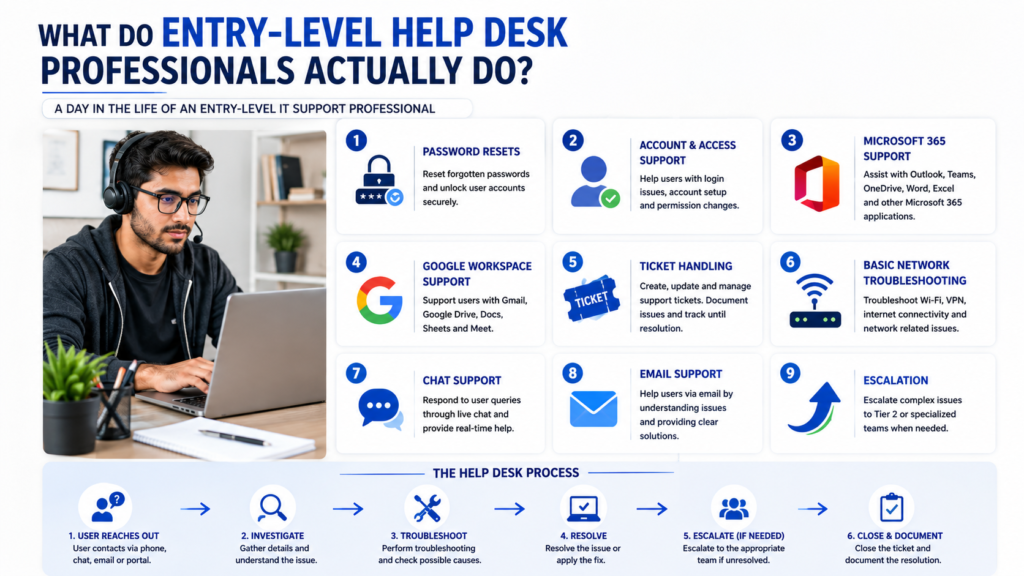
What Do Entry Level Help Desk Professionals Actually Do?
The easiest way to prepare for help desk work is to understand the problems you will probably face.
Troubleshoot Common User Problems
Troubleshooting is the core skill. The process usually starts with identifying the exact symptom. If a user says The internet does not work the technician needs more information. Does the device show a network connection? Can other websites load? Are other employees affected? Does restarting the connection change anything? Good troubleshooting reduces a vague complaint into a smaller technical problem.
Reset Passwords and Manage User Accounts
Password resets and account access issues are common support requests. Depending on the organization technicians may unlock accounts reset passwords verify identity or update account permissions through tools such as Active Directory or cloud identity platforms. Entry level candidates should understand the basic idea of users groups and permissions even if they have never managed them in a production environment.
Support Microsoft 365 and Google Workspace
Many organizations rely on productivity suites for email, documents meetings and collaboration. A beginner support professional should be comfortable with common issues involving Outlook, Teams One Drive Gmail Google Drive and browser based applications. You do not need to know every administrative feature before applying. You should understand the user experience well enough to troubleshoot basic issues logically.
Resolve Basic Network and Connectivity Issues
Entry level networking knowledge is valuable because many support problems involve connectivity. You should understand the difference between Wi Fi and internet access what an IP address represents what a router does and why restarting a connection sometimes resolves temporary issues. You should also understand that a network problem affecting one user is different from an outage affecting an entire office.
Work With Tickets and Escalations
A ticket is the record of a support request. Good tickets explain what happened what information was collected which troubleshooting steps were performed and what still needs attention. Clear documentation prevents users from repeating the entire story when a ticket reaches another technician.
Document Troubleshooting Steps
Documentation is not paperwork added after the real technical work. It is part of professional technical support. If several people encounter the same problem, good documentation helps the team identify patterns and resolve future incidents faster.
Support Users Through Chat, Email and Phone
Remote help desks communicate through several channels. BLS specifically notes that help desk technicians may respond to users by phone, online chat, email or in person. You therefore need to communicate clearly both verbally and in writing.
Skills Employers Look for in Junior IT Support
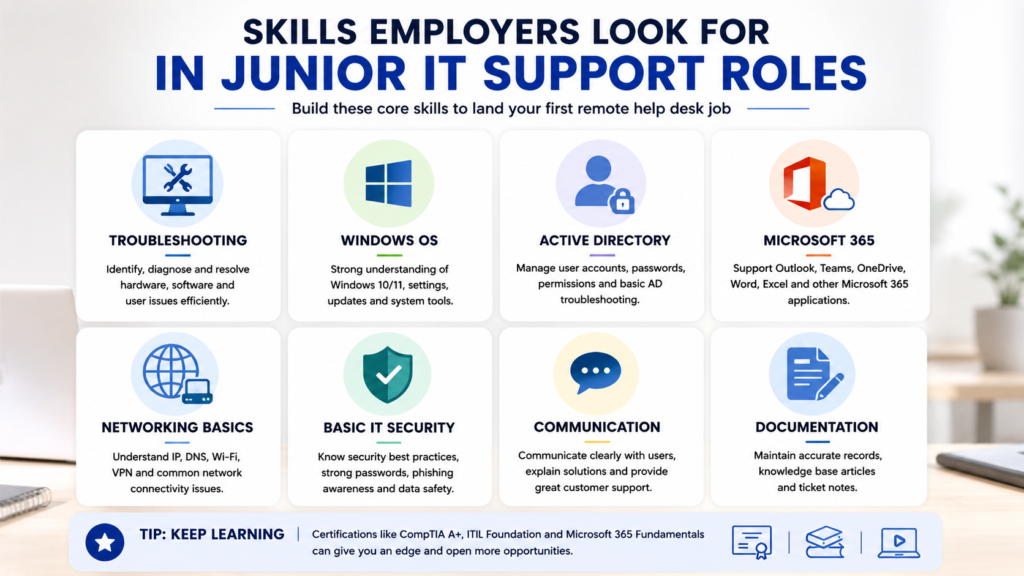
The strongest beginner candidates usually combine foundational technical knowledge with strong communication.
Troubleshooting and Problem Solving
Employers want candidates who think systematically. Instead of trying random solutions isolate the problem and test reasonable causes one by one. BLS identifies problem solving as an important quality for computer support specialists.
Windows and Operating System Basics
Many help desk environments rely heavily on Windows. Learn how to manage settings applications devices updates files permissions and common system issues. You do not need to become a Windows engineer before applying.
Active Directory Fundamentals
Active Directory appears frequently in help desk job descriptions because many organizations use directory services to manage users and access. At minimum understand users groups password resets account lockouts and permissions.
Microsoft 365
Be comfortable with the everyday use of Outlook, Teams, One Drive Word Excel and related tools. Administrative experience can strengthen your application but is not required for every entry level position.
Google Workspace
Some employers operate primarily in Gmail Google Drive Docs and Meet rather than Microsoft products. Knowing both ecosystems makes you more flexible.
Networking Fundamentals
Learn basic concepts such as IP addresses DNS routers Wi Fi Ethernet VPNs and connectivity troubleshooting. You do not need advanced network engineering knowledge for a Tier 1 role.
Security Awareness
Support professionals handle user accounts and sometimes sensitive information. You should understand phishing suspicious links password security identity verification and why technicians must follow access control procedures.
Customer Service and Communication
BLS data show that support work requires strong interaction with users and the agency lists communication listening and customer service among important qualities for the occupation. Your ability to explain a technical solution in simple language can matter as much as finding the solution itself.
Remote Support and Documentation Skills
Remote technicians cannot simply walk to a users desk. You need to gather accurate information explain steps clearly and document what happened so someone else can understand the case.
What Technical Knowledge Do You Need Before Applying?
You do not need advanced cloud engineering or cyber security knowledge before your first help desk application. You need a useful foundation.
Hardware Basics
Understand the purpose of components such as memory storage processors monitors keyboards and network adapters. You should also be able to recognize common symptoms of device problems.
Software Installation and Updates
Learn how applications are installed updated and removed. Understand why outdated software or operating systems can cause compatibility and security problems.
IP Addresses Wi Fi and Basic Networking
You should be able to explain basic networking concepts without relying on memorized definitions. Practice diagnosing whether a problem is related to one device one application or the wider network.
User Accounts and Permissions
Understand that users can have different access levels. Learn the basic concepts behind login credentials groups permissions account lockouts and least privilege access.
Basic Security Practices
Never treat security as someone else’s responsibility. Help desk staff are often the first team to hear about suspicious emails unusual account behavior or possible phishing.
Ticketing Systems and Remote Support Tools
You do not need experience with every help desk platform. Learn the concepts of creating tickets, assigning priorities documenting actions updating status and escalating incidents. If you understand the workflow learning a new platform becomes easier.
Certifications That Can Help Entry Level Candidates
Certifications can be useful when they support your practical learning.
Comp TIA A+
Comp TIA A+ is commonly associated with foundational IT support knowledge and can help beginners organize their learning around hardware, operating systems troubleshooting and support concepts. It should not become a reason to delay applications indefinitely. If you already understand the basics and can demonstrate useful skills begin applying while continuing to learn.
Google IT Support Certificate
A beginner IT support program can provide structure for someone starting from almost zero technical background. The value comes from understanding and practicing the material not simply adding the certificate name to a resume.
Microsoft Fundamentals
Microsoft focused learning can be valuable when you are targeting organizations that use Microsoft 365 Windows and cloud services. Choose learning that matches the jobs you actually want.
Do You Need a Certification to Get Hired?
Not always. BLS states that computer user support jobs do not necessarily require a college degree and that certification may be a useful entry point for some workers. A strong candidate can sometimes enter support through customer service experience practical technical skills coursework home labs or another relevant background.
Remote Help Desk Jobs May Have Location and Schedule Requirements
Remote should never be interpreted automatically as work from anywhere.
Why Remote Does Not Always Mean Work From Anywhere
Employers may only hire remote employees in states where they are set up for payroll and employment. A role may also support customers in a particular region.
State and US Residency Restrictions
Read the job location carefully before applying. Some listings say Remote US but still restrict candidates to selected states. This is common across remote work generally and current remote listings regularly show state-specific eligibility.
Eastern, Central and West Coast Time Requirements
A remote help desk supports real people during specific hours. A company may therefore require Eastern Time availability Pacific Time coverage or another schedule that matches customers and employees.
Day Evening and After Hours Support Shifts
Technical problems do not always happen between 9 AM and 5 PM. BLS notes that because computer support may be required around the clock some specialists work nights or weekends. Candidates who can work evening or weekend shifts may find opportunities that others overlook.
Why Some Help Desk Roles Still Require Occasional On Site Work
Remote software troubleshooting is possible but replacing a damaged laptop is physical work. Some employers therefore combine remote ticket support with occasional equipment handling or office coverage.
Entry Level Remote Help Desk Salary Expectations
Salary varies substantially because help desk covers different industries technical levels, locations and schedules.
What Affects Help Desk Pay?
Technical complexity matters. A basic customer technical support position may pay differently from an enterprise help desk role involving Active Directory business applications and network troubleshooting. Location employer size industry shift requirements and prior experience also affect compensation.
Tier 1 Versus More Technical Support Roles
Tier 1 roles usually handle common and repeatable problems. As technicians gain experience with networking systems cloud platforms security and advanced troubleshooting they can qualify for more specialized roles. For broader context BLS reports a median annual wage of $60340 for computer user support specialists in May 2024. This is a median across the occupation and should not be interpreted as a guaranteed entry level starting salary. The lowest 10 percent earned below $38780 while compensation varied significantly by industry.
Full Time Pay Versus Contract Work
Full time jobs may include benefits such as health insurance paid time off and retirement plans. Contract roles may sometimes offer competitive hourly rates but fewer benefits or less stability. Compare the complete employment package rather than only the headline hourly rate.
Location and Shift Differences
Pay may differ by geography and schedule. Night weekend or specialized support work can sometimes have different compensation than standard daytime Tier 1 support.
How Compensation Can Grow With Experience
The first help desk job should also be viewed as a platform for skill development. BLS notes that computer support specialists can advance into information security network and systems administration software development and management roles.
Where to Find Legitimate Remote Help Desk Jobs
A strong search combines job platforms with employer verification.
Official Employer Career Pages
When you identify an interesting employer check its careers page directly. This is especially important for remote roles because old listings are frequently copied across job sites long after the original vacancy closes.
Established Job Platforms
Large job platforms can help discover opportunities quickly. Use filters for remote work entry level full time and location, but do not rely on a single job title.
Remote Job Boards
Remote focused platforms can reveal support roles from companies that operate distributed teams. Always verify the opening on the employers own site when possible.
Search More Than One Job Title
Instead of only searching:
remote help desk jobs entry level
also search variations such as:
Tier 1 service desk remote
IT support specialist remote
remote help desk technician
technical support representative remote
junior IT support remote
Different companies can describe almost identical work using different titles.
Set Up Targeted Job Alerts
Create separate alerts for your strongest titles instead of one extremely broad remote jobs alert. This keeps results closer to your actual career goal.
Verify a Job Before Applying
Check the company website location requirement and application domain. If the employers career page does not contain the vacancy investigate further before providing sensitive information.
Companies Hiring Entry Level Remote Help Desk Professionals
Current hiring changes too quickly for any company list to remain permanently accurate. At the time of this 2026 update Concentrix has a US work from home Customer Service . Tech Support Representative opening involving hardware and software troubleshooting problem solving and support documentation. This is an example of the type of opportunity that may appear not a guarantee that the same vacancy will remain open.
Why Current Hiring Lists Change Quickly
Entry level remote jobs can receive many applications. A vacancy that is open today may close after the employer reaches enough qualified candidates.
How to Find Employers Hiring Right Now
Search the employers career site for help desk service desk technical support and IT support. Look beyond the exact title that brought you to this article.
How to Verify an Opening on the Employer Website
Check that the job title location responsibilities and application process all appear on the official employer site. Avoid applying through copied pages when you can access the original vacancy.
How to Build a Resume for Remote Help Desk Jobs
Your resume should make the employer believe you can solve user problems professionally.
Lead With Relevant Technical Skills
Place your strongest relevant technical skills where recruiters can see them quickly. Focus on skills you can actually explain in an interview.
Show Customer Service Experience
Do not hide customer facing experience because it was not an IT job. Translate it into help desk value. Show how you handled difficult situations communicated clearly investigated problems and followed processes.
Include Home Labs and Practical Projects
A home lab can provide useful evidence when you have no professional IT background. You might create Windows user accounts practice permissions configure a small network or document a troubleshooting exercise. The project does not need to be massive.
Describe Troubleshooting With Outcomes
Instead of writing Good at troubleshooting computers. Describe what you did. For example you might explain that you diagnosed a recurring Wi Fi issue isolated the cause and restored connectivity. Your examples should always be truthful.
Tailor the Resume to the Job Description
A service desk job emphasizing Microsoft 365 should see your relevant Microsoft experience. A technical customer support role should see both troubleshooting and customer communication.
Avoid Claiming Skills You Cannot Demonstrate
Keyword stuffing a resume with tools you have never used can create problems during interviews. A smaller list of genuine skills is more valuable than a large list you cannot explain.
How to Get Practical IT Experience Before Your First Help Desk Job
You do not need to wait for an employer to begin practicing.
Build a Simple Home Lab
Use a spare computer virtual machine or your own device to practice basic tasks. Create accounts adjust permissions install software and document what you changed.
Practice Windows User and Permission Tasks
Learn how local accounts work and understand the concept behind administrative and standard permissions. You can later extend this knowledge into directory service environments.
Learn Basic Networking Troubleshooting
Practice checking network connections identifying your IP address and understanding how devices connect through a router. Try to understand why a solution works rather than memorizing commands.
Practice Microsoft 365 or Google Workspace Tasks
Become comfortable helping another person with common productivity tasks. Think like a support technician rather than only a user.
Document Your Troubleshooting Process
Choose a problem and write down what happened what you checked what you changed and what solved it. This develops the same thinking pattern used in professional tickets.
How to Apply for Remote Help Desk Jobs Entry Level
Getting hired is partly a numbers game but random applications are inefficient.
Apply to Closely Related Job Titles
Do not wait for a listing that uses your exact preferred title. If the responsibilities match your abilities consider Service Desk Technician IT Support Specialist Help Desk Analyst and Technical Support roles.
Match Your Resume to Required Skills
Read the required skills before applying. If you genuinely have relevant experience make sure the resume shows it clearly.
Apply Early to Relevant Openings
Remote entry level roles can attract substantial interest. Applying while a relevant vacancy is still fresh can help prevent you from arriving after the employer has already built a large candidate pool.
Keep Track of Applications
Record the company job title application date and status. You should know which role a recruiter is discussing when they contact you.
Follow Up Professionally
If the employer provides an appropriate contact method a brief professional follow up can show continued interest. Avoid repeated messages that pressure recruiters.
Use Referrals Without Depending on Them
A referral may help your application receive attention but it should support a qualified application rather than replace one. Continue applying even when you do not know anyone at the company.
How Companies Hire Entry Level Remote Help Desk Staff
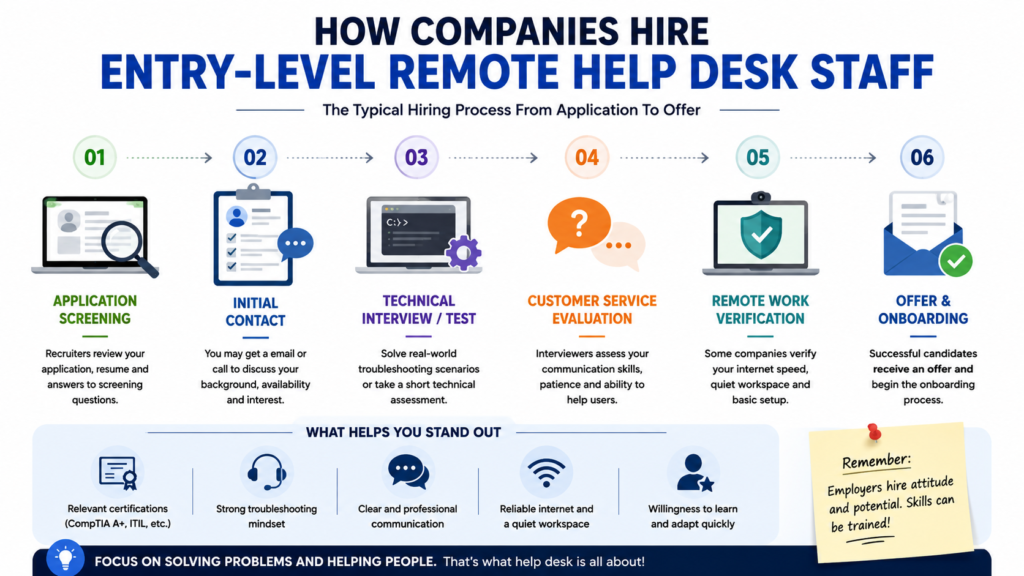
Hiring processes vary but beginners should prepare for both communication and technical questions.
Recruiter or HR Screening
The first conversation may confirm your experience availability location and interest in the position. Remote employers may also ask about your home workspace and internet connection. Current remote technical support postings can explicitly require a quiet home environment and reliable computer access for pre employment testing.
Technical Support Interview
You may be asked about Windows networking user accounts or common software problems. Interviewers usually care about how you think as well as whether you know the final answer.
Troubleshooting Scenario
A common scenario might involve a user whose internet email or application is not working. Explain what you would check first and why.
Customer Service Questions
You may be asked how you would respond to an angry or frustrated user. Do not treat this as separate from technical support. It is part of the job.
Remote Work and Schedule Verification
The employer may confirm state eligibility internet reliability workspace expectations and shift availability.
Final Offer and Onboarding
Before accepting confirm compensation schedule benefits equipment policy employment type and remote work requirements.
How Long the Hiring Process Can Take
There is no universal timeline. A company with an urgent support need may move quickly while an organization requiring several interviews assessments and background checks may take longer. Ask the recruiter what the next stage is and when you should reasonably expect an update.
Common Help Desk Interview Questions to Prepare For
Preparation should focus on explaining your reasoning rather than memorizing perfect answers.
How Would You Troubleshoot a User Who Cannot Connect to Wi-Fi?
Start by gathering information. Determine whether only one device is affected whether Wi Fi is enabled and whether other users can connect. Then work from the simplest likely causes toward more complex ones.
What Would You Do if a User Forgot Their Password?
Confirm the user’s identity according to company policy before resetting access. Security procedures matter even when the technical solution itself is simple.
How Do You Handle a Frustrated User?
Listen first.
Acknowledge the problem without becoming defensive and explain what you are checking in clear language. The goal is to resolve both the technical issue and the communication problem.
When Should You Escalate a Ticket?
Escalate when the issue exceeds your access, knowledge or defined Tier 1 responsibility. Before escalating document what you already tested.
How Would You Explain a Technical Issue to a Nontechnical User?
Avoid jargon when a simpler explanation is available. Strong support professionals adjust their language to the user rather than expecting the user to understand IT terminology.
How to Avoid Fake Remote Help Desk Jobs
Remote job seekers need to be especially careful because legitimate recruiting and scams can both happen entirely online.
Verify the Employer and Job Posting
Find the company’s official website independently and confirm that the vacancy exists. Do not rely only on a link sent by an unknown recruiter.
Never Pay to Get Hired
The Federal Trade Commission warns that honest employers do not require applicants to pay for the promise of a job. Be suspicious if someone asks you to buy equipment send gift cards or transfer money before employment begins.
Be Careful With Unsolicited Job Messages
The FTC warned in April 2026 about fake recruiters sending unsolicited job texts and pretending to represent legitimate companies. An unexpected message promising easy remote income should be verified independently before you respond.
Protect Personal and Financial Information
Employers may eventually need sensitive information for legitimate payroll and background processes but timing and context matter. Do not send banking details identification documents or other sensitive information to an unverified recruiter.
Career Growth After an Entry Level Help Desk Job
Help desk does not have to be the end of your IT career. It can be the place where you learn how real users systems and business technology interact. BLS notes that computer support specialists may advance into network and systems administration information security software development or management positions.
Tier 2 Technical Support
Tier 2 support handles more complex incidents and often requires deeper troubleshooting. This is a natural progression for technicians who enjoy solving technical problems.
System Administration
Experience with user accounts, permissions Windows and business systems can lead toward system administration.
Network Support
If connectivity and infrastructure interest you strengthen your networking knowledge and move toward network support roles.
Cloud Support
Modern organizations increasingly operate applications and infrastructure through cloud services. Help desk experience combined with cloud skills can open new support paths.
Cyber security
Support professionals already work with passwords accounts phishing and access issues. Building stronger security skills can eventually support a transition into cyber security.
Technical Program or IT Operations Roles
Some professionals discover that they enjoy coordinating technical work more than performing deep troubleshooting. Experience understanding users incidents and IT processes can eventually contribute to IT operations or technical program careers. For a broader view of technology career paths readers can also explore our remote IT jobs guide.
Do entry level help desk jobs require a degree?
Not always. BLS says computer user support roles do not necessarily require a college degree and some candidates qualify through computer knowledge coursework or a high school diploma combined with relevant certifications.
Do I need Comp TIA A+ for a help desk job?
Not every employer requires it. A certification can strengthen a beginner resume but employers may also consider practical skills customer service experience and other technical training.
Can help desk jobs be fully remote?
Yes some are fully remote although others remain hybrid or on site. BLS reports that telework is possible for some computer support specialists while other roles require physical presence or travel.
Is customer service experience useful for help desk work?
Yes. Communication listening and customer service skills are important parts of computer support work especially when users are frustrated or do not understand technical terminology.
What should I learn first for an IT help desk job?
Start with Windows basics hardware account management basic networking Microsoft 365 security awareness and structured troubleshooting. Learn how to document what you tried rather than only memorizing solutions.
What other job titles should I search besides Help Desk Technician?
Useful alternatives include Service Desk Technician Tier 1 Support Agent Help Desk Analyst IT Support Specialist Junior IT Support Specialist Technical Support Representative and End User Support Technician.
Conclusion
Remote help desk jobs entry level can be an achievable starting point for people who want to build an IT career without waiting until they have years of technical experience. The strongest beginner candidates combine foundational technical knowledge with customer service communication and structured troubleshooting. Learn Windows networking basics account support Microsoft 365 or Google Workspace and basic security practices. Then practice those skills through home labs and real troubleshooting situations so you can explain what you know during interviews.
Do not limit your search to one title. Help Desk Technician Service Desk Technician Tier 1 IT Support Specialist Help Desk Analyst Technical Support Representative and Junior IT Support Specialist can all lead into similar early career support work. Remote opportunities also require realistic expectations. A remote job may still restrict your state time zone or schedule and competition can be stronger than for local on site positions.
Apply to roles that genuinely match your skills tailor your resume to the employer’s needs and verify every opening before sharing personal information. Your first support job does not need to be your final destination. The experience you gain troubleshooting real systems and helping real users can eventually support careers in system administration networking cloud support cyber security software engineering or technical operations.

2 Comments
Pingback: No Phone Remote Jobs Work From Home Roles Without Constant Phone Calls
Pingback: RN Work From Home Positions: Remote Nursing Jobs Guide for Nurses